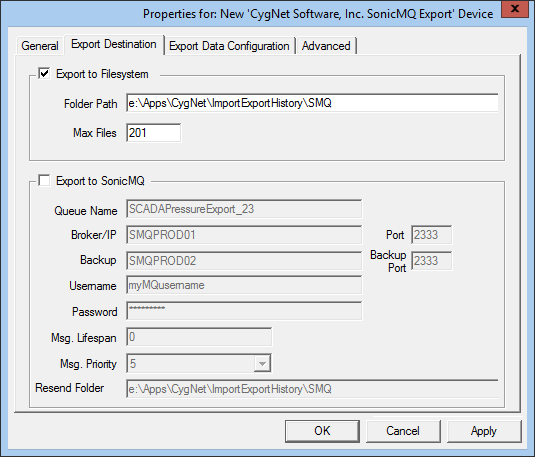
The Export Destination page specifies the destination of the export. Data can be exported to a standard file system directory and/or to a configured SonicMQ Broker queue.
The properties for each section of this page are described below.
| Property | Description |
|---|---|
|
Export to Filesystem |
Click to export data to the specified folder on the standard file system. |
|
Folder Path |
Path to the folder on the standard file system. |
|
Max Files |
Maximum number of files that can be stored in the folder. |
| Export to SonicMQ | Click to export the data to the SonicMQ broker. |
|
Queue Name |
SonicMQ queue name. |
|
Broker/IP |
Computer name or TCP/IP address hosting the Sonic MQ broker. |
|
Port |
Port number of the SonicMQ broker. |
|
Backup Broker/IP |
Secondary broker or IP address used in case the primary broker fails. |
|
Backup Port |
Port associated with the secondary broker. |
|
Username |
User name required to connect to the SonicMQ broker. |
|
Password |
Password required to connect to the SonicMQ broker. |
|
Msg. Lifespan |
The amount of time the message stays on the broker. |
|
Msg. Priority |
The priority of the message. Messages with a higher priority are processed first. |
|
Resend Folder |
Path and name for files that need to be resent. |

|
|
|

